
Comprehensive Cost Analysis Features
Detailed Cost Breakdown
Split costs by runner types (UBUNTU, MACOS, WINDOWS). Get a comprehensive view of your expenses based on the operating systems used.
Repository Analysis
Track usage and expenses by specific repository. Understand which repositories are consuming the most resources and driving your costs.
Historical Trends
Monitor usage and expense trends over time to identify optimization opportunities. Spot patterns and make data-driven decisions to reduce costs.
Expensive Workflow Detection
Automatically identify workflows with the highest resource consumption. Focus your optimization efforts where they will have the biggest impact.
See It In Action
Get a glimpse of our powerful cost analysis dashboard with real-time data visualization.
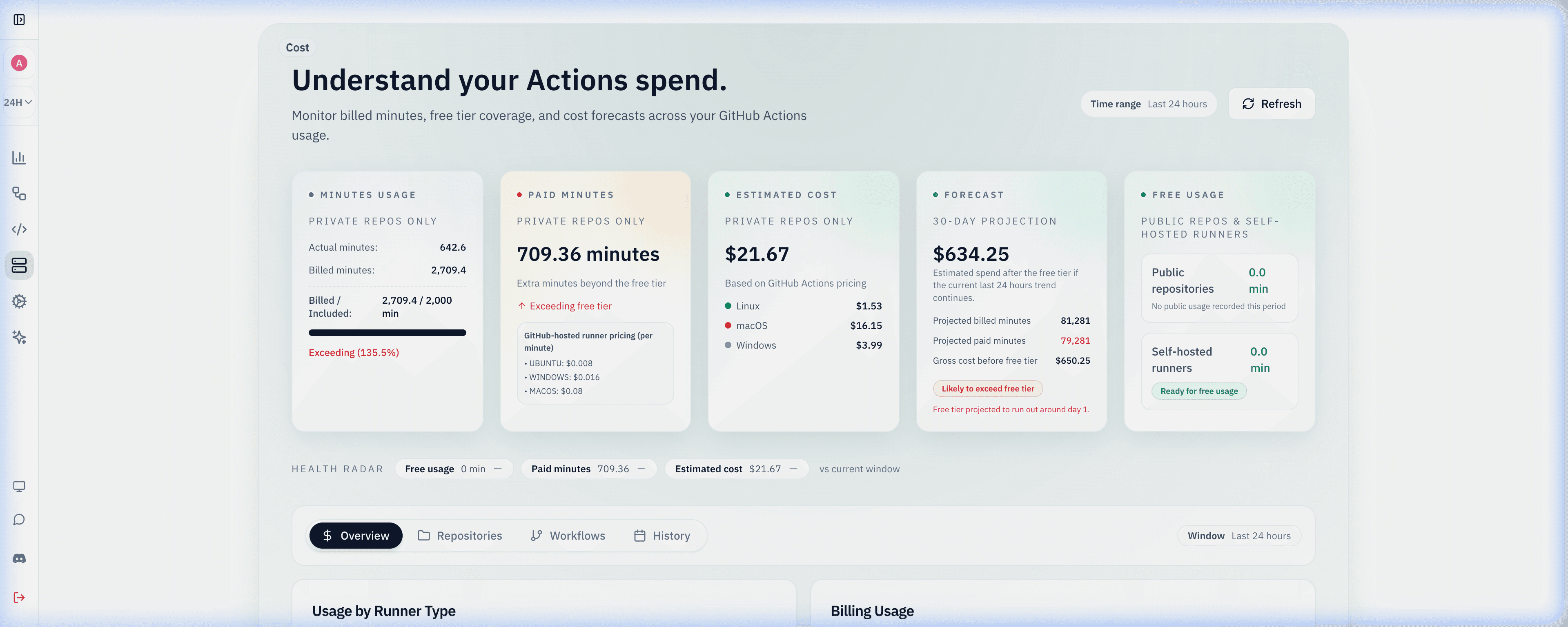
Our intuitive dashboard gives you complete visibility into your workflow costs, helping you identify optimization opportunities at a glance.
How Cost Analysis Works
A comprehensive system for tracking, analyzing, and optimizing your workflow costs across all repositories.
Automatic Cost Tracking
All workflow runs are automatically tracked for resource usage and associated costs. No special configuration or changes to your code are required.
Detailed Analysis
View comprehensive cost breakdowns by repository, workflow, job, and step. Analyze trends over time and identify cost patterns.
Optimization Recommendations
Receive AI-powered recommendations for optimizing your workflow costs. Implement changes and track the impact on your spending.
GitHub Actions cost observability
See how Ubuntu, macOS, Windows, and self-hosted runners contribute to your monthly GitHub Actions bill with repository-level and workflow-level breakdowns. Planning a new workload? Try the free GitHub Actions cost calculator first.
Historical trend views reveal cost spikes after infrastructure changes, new workflows, or runner migrations.
Combine cost analytics with runners management to right-size self-hosted fleets and reduce unnecessary macOS usage, and set cost alerts so spikes are caught the day they start.
Cost Analysis FAQ
How is GitHub Actions cost calculated?
GitHub bills each job per minute, rounding partial minutes up, at a rate set by the runner. As of September 2026 GitHub lists standard 2-core Linux at $0.006 per minute, Windows at $0.010, and macOS at $0.062. Gitera applies the rate for the runner each job actually used, so macOS and Windows jobs are not undercounted as Linux minutes.
Why is my macOS GitHub Actions bill so high?
A macOS minute costs roughly ten times a Linux minute, so a single iOS or desktop build workflow can dominate the invoice. Gitera breaks spend down by repository, workflow, and runner type, which makes it obvious when a job that could run on Linux is running on macOS, or when a macOS matrix runs on every push instead of only on release branches. You can also ask the AI agent which workflows are the most expensive.
Do self-hosted runners count toward GitHub Actions cost?
Self-hosted runner minutes are not billed at the hosted per-minute rates (see the GitHub Actions cost calculator for current rates), so Gitera reports them as zero-cost minutes while still showing their volume. That separation lets you compare what a workload would cost on GitHub-hosted runners against what it consumes on your own runner fleet before deciding where it should run.
How can I reduce GitHub Actions costs?
Start with the most expensive workflows: cache dependencies, cancel superseded runs with concurrency groups, move jobs that do not need macOS or Windows to Linux, and trigger heavy suites only on the paths that affect them. Gitera's historical trends then confirm whether each change actually lowered billable minutes instead of only moving them elsewhere.
Related Gitera capabilities
Guides on the Gitera blog
Explore all features on the Gitera homepage or read insights on the blog.