
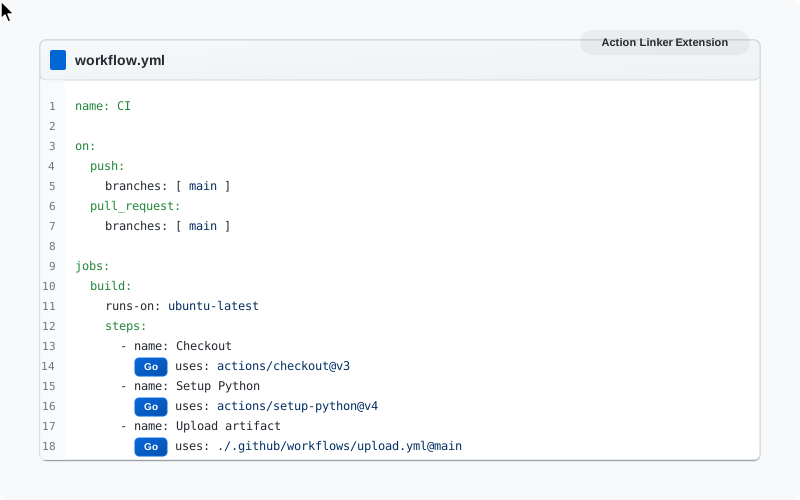
See It in Action
A quick look at how Action Linker makes GitHub workflows navigable
Key Features
A simple yet powerful solution that makes GitHub even more developer-friendly
Multiple Format Support
Supports various reference types: files, local workflow files, action files, and more
Dynamic URL Generation
Automatic detection of repository owner, branch name, and local references
User-Friendly Buttons
Design that matches GitHub's interface with hover and click effects
Seamless Integration
Works immediately after installation, no setup or configuration needed
Open Source
Open-source project that you can contribute to and improve
Fast & Efficient
Client-side operation, lightweight and no impact on site performance
Supported Formats
The extension supports a wide range of GitHub Actions reference formats
Remote Reusable Workflow File
Navigate directly to a workflow file in another repository
Local Reusable Workflow File
Navigate to a workflow file in the same repository
Remote Action File
Navigate directly to an action file in another repository
External Repository Reference
Navigate directly to the action's repository at the specific version
How It Works
A simple four-step process that makes GitHub paths 'clickable'
Scan & Detect
The extension scans GitHub text areas containing workflow or action files
Create Links
The extension identifies the reference format and generates the appropriate URL
Add Buttons
Interactive buttons are added next to each reference, enabling quick navigation
Smooth Navigation
Clicking the button opens the link in a new tab, without leaving the current page
Simple Installation
Just one quick step and you're ready to go
Limitations
- •The extension works only on GitHub (https://github.com/ URLs)
- •It relies on GitHub's current UI structure; changes in GitHub's UI may require updates
- •Currently only supported in Google Chrome
License
This project is licensed under the MIT License.
All rights reserved © 2026
Bridge GitHub UI and CI observability
Action Link adds contextual links from workflow YAML and run pages to related resources, reducing context switching for developers debugging pipelines.
The extension complements Gitera’s platform by surfacing observability entry points directly inside github.com — especially useful when tracing reusable workflow callers or reviewing third-party actions found by the actions analyzer.
Install free from the Chrome Web Store and pair with the GitHub Actions dashboard and workflow management for end-to-end workflow visibility.
Action Link FAQ
What does the Action Link Chrome extension do?
Action Link turns uses: references in GitHub workflow and action files into clickable links. When you read a workflow on github.com, each referenced reusable workflow, local workflow file, composite action, or external action gets a button that opens the exact file or repository at the referenced version in a new tab.
Which GitHub Actions reference formats does Action Link support?
It supports remote reusable workflows such as org/repo/.github/workflows/file.yml@ref, local reusable workflows such as ./.github/workflows/file.yml, actions stored in another repository's .github/actions folder, and external action repositories at a specific tag, branch, or commit. It detects the repository owner and branch automatically for local references.
Is Action Link free and open source?
Yes. Action Link is free on the Chrome Web Store and released under the MIT License, with source code on GitHub where you can open issues or submit pull requests. It runs entirely client-side on github.com pages, does not need a Gitera account, and requires no configuration after installation.
Does Action Link work in browsers other than Chrome?
It is currently supported only in Google Chrome and only on github.com URLs. Because it reads GitHub's page structure, a major GitHub UI change can require an extension update. Support for additional browsers is one of the contribution areas listed in the open-source project.
Related Gitera capabilities
Explore all features on the Gitera homepage or read insights on the blog.