
Key Actions Analyzer Features
Comprehensive Action Inventory
Automatically catalog all GitHub Actions used across your organization's workflows, with detailed usage statistics and version information.
Security Risk Detection
Identify potentially risky third-party actions that could compromise your workflow security or introduce vulnerabilities.
Action Categories
Automatically categorize actions as official GitHub, third-party, or local custom actions for better organization and risk assessment.
Version Analysis
Track which versions of actions are used across repositories and identify outdated or inconsistent versions that need updating.
Workflow Mapping
See which workflows use specific actions and understand dependencies between your CI/CD processes and third-party components.
Standardization Recommendations
Get suggestions for standardizing action usage across repositories to improve security and maintainability of your workflows.
How It Works
Connect
Connect your GitHub organization to scan all repositories and workflows.
Analyze
Our system automatically analyzes all actions used in your workflows.
Optimize
Get insights and recommendations to improve security and efficiency.
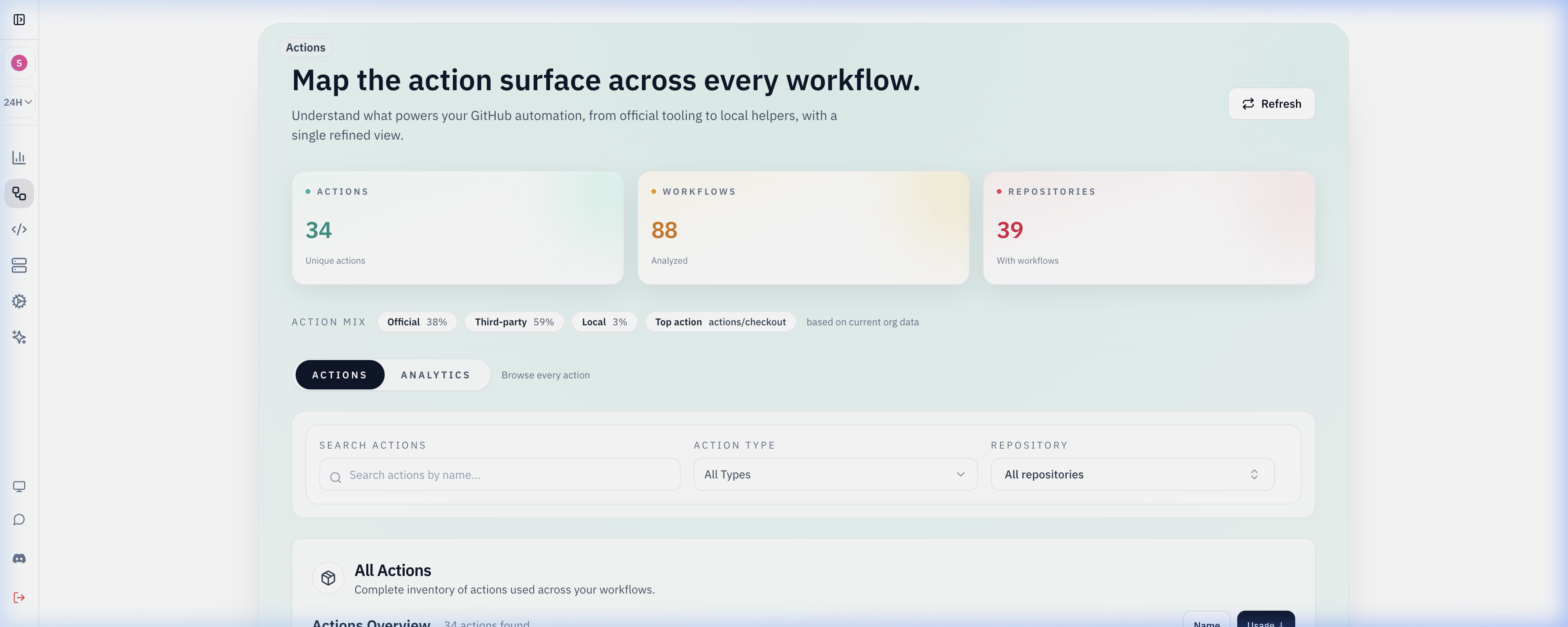
Actions Analyzer Dashboard
Comprehensive analysis of all GitHub Actions - with detailed insights and security recommendations.
Real-World Use Cases
Security Audit
A financial services company used the Actions Analyzer to identify and replace several third-party actions with security vulnerabilities, preventing potential data breaches.
Version Standardization
A software development team discovered they were using 5 different versions of the same action across 20 repositories, causing inconsistent builds. They standardized to a single version.
Workflow Optimization
By analyzing action usage patterns, a tech company identified redundant steps in their CI pipeline and consolidated workflows, reducing build times by 40%.
Compliance Reporting
A healthcare company used Actions Analyzer to generate reports proving their CI/CD pipelines only use approved, secure actions for regulatory compliance audits.
Why Use Actions Analyzer
Gain complete visibility and control over all GitHub Actions used in your organization.
Enhance Security
Identify and replace potentially risky third-party actions to protect your workflows and code.
Standardize Practices
Ensure consistent action usage across all repositories to improve maintainability and reliability.
Save Time
Quickly identify which actions are used where, without manually reviewing dozens of workflow files.
Improve Governance
Enforce organizational policies about which actions can be used and which versions are approved.
Organization-wide Actions inventory
Gitera catalogs official, third-party, and local actions across all workflows so security teams can audit versions and publishers in one place.
Usage analytics show which actions are most adopted and which repos introduced new dependencies recently; open any of them straight from a workflow file with the Action Link Chrome extension.
Filter by repository or action type to streamline compliance reviews and deprecate risky marketplace actions, then turn the findings into enforceable GitHub Actions security policies.
Actions Analyzer FAQ
How do I list every GitHub Action used in my organization?
GitHub has no built-in organization-wide inventory of actions. Gitera parses the workflow files in every connected repository and builds one catalog of each action, the versions in use, and the workflows and repositories that reference it, so you can answer who uses a given action without cloning or searching each repository. Shared workflows get their own consumer map in reusable workflows management, and the free Action Link extension makes each uses: reference clickable on github.com.
Should GitHub Actions be pinned to a commit SHA?
Pinning to a full commit SHA is the strongest option because a tag or branch can be moved to different code after you reviewed it. Gitera scores pinning quality for every reference: commit SHAs are strongest, semantic version tags are acceptable, and branch references such as @main are flagged as risky.
How do I audit third-party GitHub Actions for security?
Start from the inventory: separate official, third-party, and local actions, then review which third-party publishers you depend on and how each reference is pinned. Gitera shows those categories and version spread per action, so security reviews can focus on unpinned or rarely used third-party actions instead of reading every workflow file. Required actions can then be enforced with security policies.
How can I standardize action versions across repositories?
Version analysis shows every version of an action in use and which repositories are behind. Use it to pick a target version, update the outliers, and then enforce the standard with a security policy such as requiring a specific action to exist in workflows, so new repositories do not drift back to older versions.
Related Gitera capabilities
Explore all features on the Gitera homepage or read insights on the blog.